Article
Building a Skill for Communications Visibility
QuintoAndar | AI Tooling, Internal Tools, Workflow Automation
Rules Nobody Could See
QuintoAndar's communication rules, over 500 of them with 2,500+ templates across email, WhatsApp, and SMS, lived entirely in code. Teams like property intake inspections couldn't get a real answer about their own communication cadence. Even engineering had to investigate events one by one to know what each of them triggered. The maps people built by hand in Figma went stale as soon as anything changed.
Picking It Back Up
Early on, I was on Comms System, the team responsible for this system, and we had a plan to give the rest of the company real visibility. The first tool we shipped let people browse templates by channel. The second was a journey-level view showing what fires for whom, in what sequence, and with what fallback. It got deprioritized as other work took over, and I moved to a different team before it shipped.
On my new team, I needed to map one piece of a different journey: what an owner and a tenant each receive between an accepted rental proposal and a signed contract. The same problem was still there. Seeing it meant digging through code and cross-referencing logs by hand.
How It Works
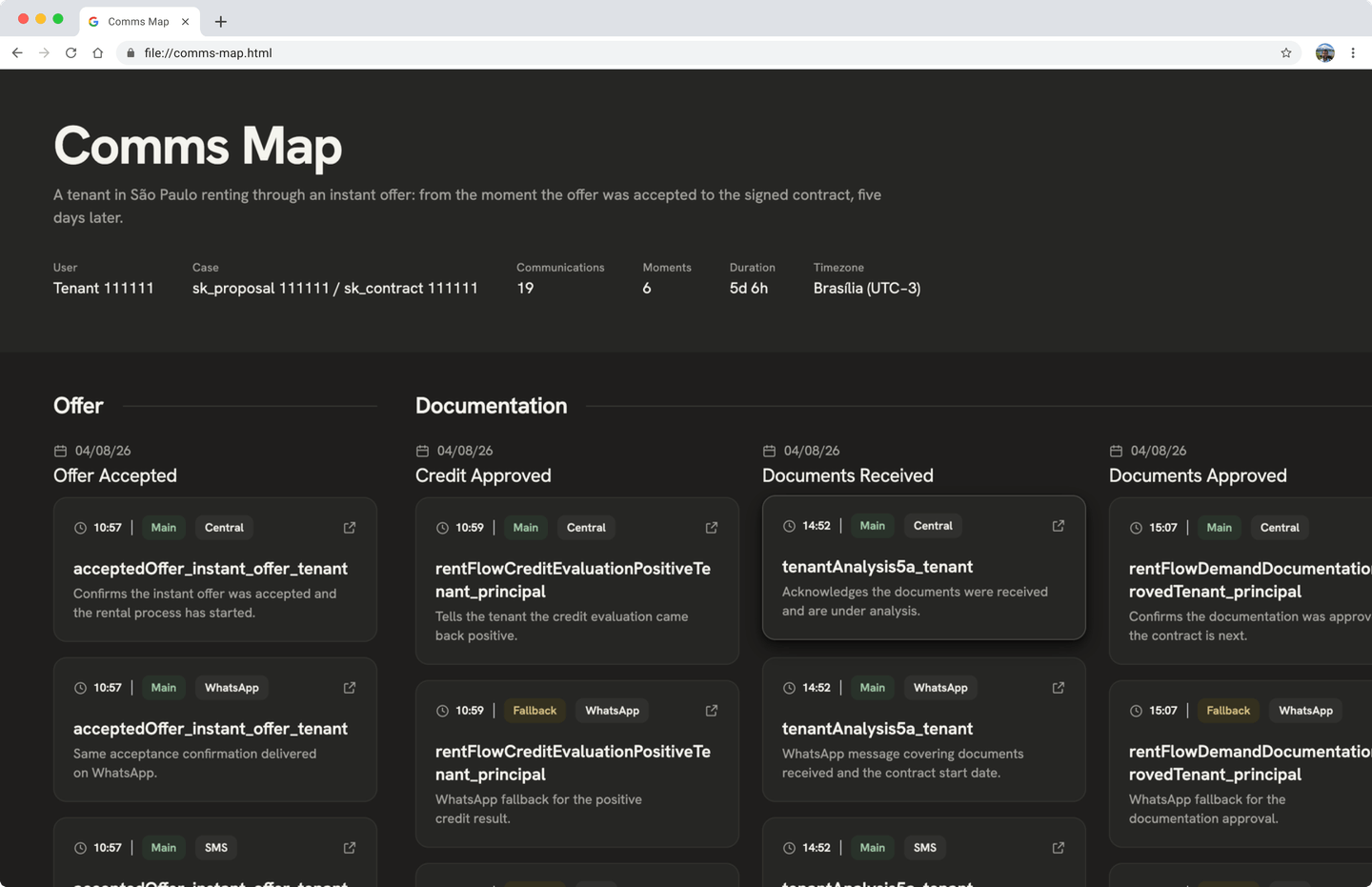
By then AI coding tools were available and encouraged across the company, so I built a skill that pulls from real, correlated data. Given a specific property, proposal, contract, and user, it queries the rules and dispatch service directly and returns only the communications tied to that exact case. The output is an interactive page with a visual timeline. Each communication shows up as a card with its template context, channel, send time, and a link to the actual template used.
People could usually find a template, but they couldn't tell when or where it had fired. Or they'd find a dispatch log entry with no way to see what was sent. The skill brings both into the same view.
You call it with a plain-language request:
/comms-map rent, tenant, from accepted offer to signed contract, last 20 days, São PauloWith those five details up front (business, persona, journey range, timeframe, region), it skips the back-and-forth and infers whatever you leave out.
Who Uses It Now
I refined it until I was happy with it, then shared it with the design team. They took it further and embedded a live template preview directly into the page. The PMM team, mapping communications ahead of a migration to Salesforce Marketing Cloud, adopted it to get more visibility into that work. Product came to me directly to use it for their own mapping. And the Comms System team, the one I'd left, ended up building a deeper version of the same idea for themselves, using my skill as the reference for the criteria theirs should follow.
More work
Case study
Loft App
Loft had no mobile app, only a slow, high-bounce mobile site. As founding product designer, I led the app from MVP to a personalized native experience, raising lead-to-schedule conversion 16% and ranking top 10 in its App Store category.
Loft | UI Design, UX Design, User Research, Product Strategy
Case study
Contract Template Management
Contract templates lived in hand-coded HTML, taking engineers weeks to update and leaving one attachment type editable with no audit trail. I designed a system giving the legal team direct control, closing a compliance risk ahead of the company's IPO.
QuintoAndar | UI Design, Systems Thinking, Product Strategy, Stakeholder Management
Case study
Third-party Claims
Third parties in a car accident had to call support to file a claim, driving cost and frustration. I designed and validated a digital self-service journey that moved 40% of claims off the phone within a month of launch.
Youse Seguros | UI Design, UX Design, User Research, Usability Testing